









In the world of gaming, having a powerful PC can make all the difference between a thrilling experience and a frustrating one. With the rise of high-performance games and demanding graphics, many gamers are opting to build their own gaming PCs. This guide aims to provide you with an in-depth understanding of how to choose the right components, assemble your machine, and optimize it for the best gaming experience.
Understanding Your Gaming Needs

Before diving into the world of PC building, it’s essential to assess your gaming needs. Different games have varying requirements in terms of processing power, graphics capabilities, and memory. For instance, if you’re an avid player of resource-intensive games like Cyberpunk 2077 or Microsoft Flight Simulator, you’ll need a robust setup.
In general, consider the following factors when determining your gaming needs:
- Game Genre: First-person shooters may demand faster frame rates, while strategy games may require more RAM for smooth multitasking.
- Resolution: Higher resolutions (like 4K) require more powerful GPUs to render graphics effectively.
- Future Proofing: Investing in slightly better components now can save you from needing an upgrade sooner than expected.
Choosing the Right Components
Once you’ve assessed your needs, it’s time to select the components for your gaming PC. Each part plays a crucial role in the overall performance of your machine:
1. CPU (Processor): The central processing unit is the brain of your PC. For gaming, consider quad-core or hexa-core processors from Intel or AMD.
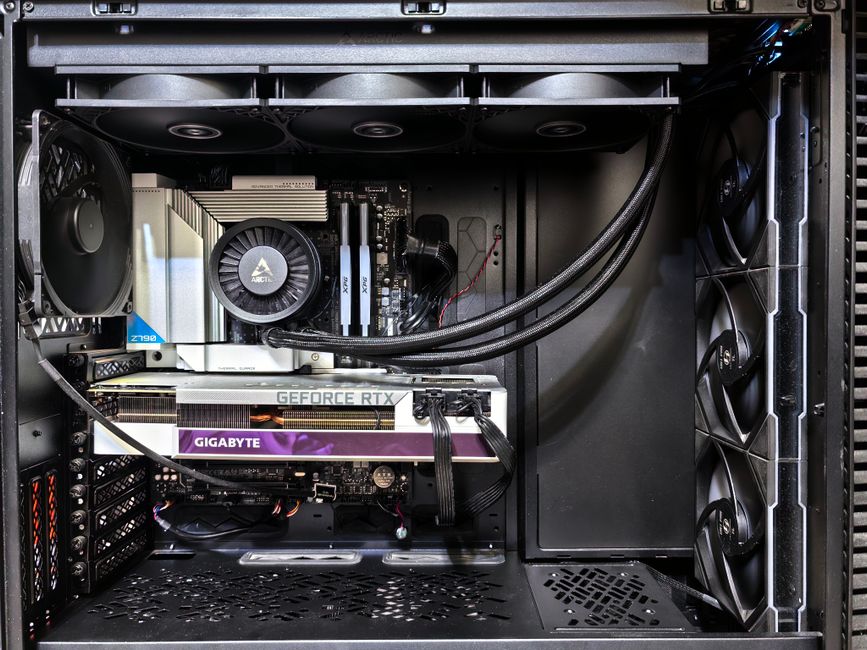
2. GPU (Graphics Card): This is perhaps the most critical component for gaming. High-performance graphics cards like NVIDIA’s RTX series or AMD’s RX series will deliver stunning visuals.
3. RAM: A minimum of 16GB is recommended for most gaming setups today. Faster RAM can improve performance in certain games.
4. Storage: SSDs provide faster load times compared to traditional HDDs. A combination of both can offer ample storage and speed.
5. Motherboard: Ensure compatibility with your CPU and other components. Features like USB ports, Wi-Fi capabilities, and expandability options are also important.
For the best guidance on component compatibility, consider using a dedicated gaming PC builder tool. These platforms help you visualize your build and ensure all parts work together seamlessly.
Assembling Your Gaming PC
With all your components at hand, it’s time to assemble your gaming PC. Here’s a step-by-step guide:
1. Prepare Your Workspace: Ensure you have a clean, static-free environment with adequate lighting. A large table can help accommodate all your parts.
2. Install the CPU: Carefully place the CPU into the motherboard socket, ensuring the alignment is correct. Secure it with the locking mechanism.
3. Attach the Cooler: Whether liquid or air cooling, make sure to follow the manufacturer’s instructions for mounting.
4. Install RAM: Insert the RAM sticks into the appropriate slots, ensuring they click into place.
5. Mount the Motherboard: Secure the motherboard into the case using screws, ensuring all necessary connections are accessible.
6. Install the GPU: Slot the graphics card into the PCIe slot and secure it with screws.
7. Connect Storage Devices: Attach SSDs or HDDs to the motherboard and power supply.
8. Finalize Cable Management: Tidy up the cables for better airflow and aesthetics.
Optimizing Your Gaming PC
After assembling your PC, optimization is key to enhancing performance. Here are some tips:
1. Update Drivers: Ensure all drivers, particularly for your GPU, are up to date for optimal performance.
2. Overclocking: If you’re comfortable, consider overclocking your CPU and GPU to squeeze out additional performance.
3. Cooling Solutions: Ensure your system has adequate cooling, especially if you’re overclocking. Monitor temperatures and adjust fan speeds as necessary.
4. Game Settings: Adjust in-game settings to balance performance and visuals based on your hardware capabilities.
Conclusion
Building your own gaming PC can be a rewarding experience that not only enhances your gaming but also provides a sense of accomplishment. By understanding your gaming needs, carefully selecting components, properly assembling your PC, and optimizing its performance, you can create a powerful machine tailored to your preferences. Whether you’re a casual gamer or a hardcore enthusiast, a custom-built gaming PC will elevate your gameplay to a new level.